
Understanding Your Display: What Do All the Symbols on Your Vape Mean?
Many modern vape devices are equipped with a display that shows information about the battery, power, resistance and various safety features. For new users, the symbols can sometimes seem confusing, especially since different manufacturers use different menus and interfaces.
Although the appearance may differ between models, most displays show similar types of information. By understanding what the symbols mean, it becomes easier to use the device and interpret the messages displayed on the screen.
In this article, we go through some of the most common symbols and indicators that may be displayed on a vape.
Why Do Some Vapes Have a Display?
The display functions as an information panel where the user can see important information about the device's status.
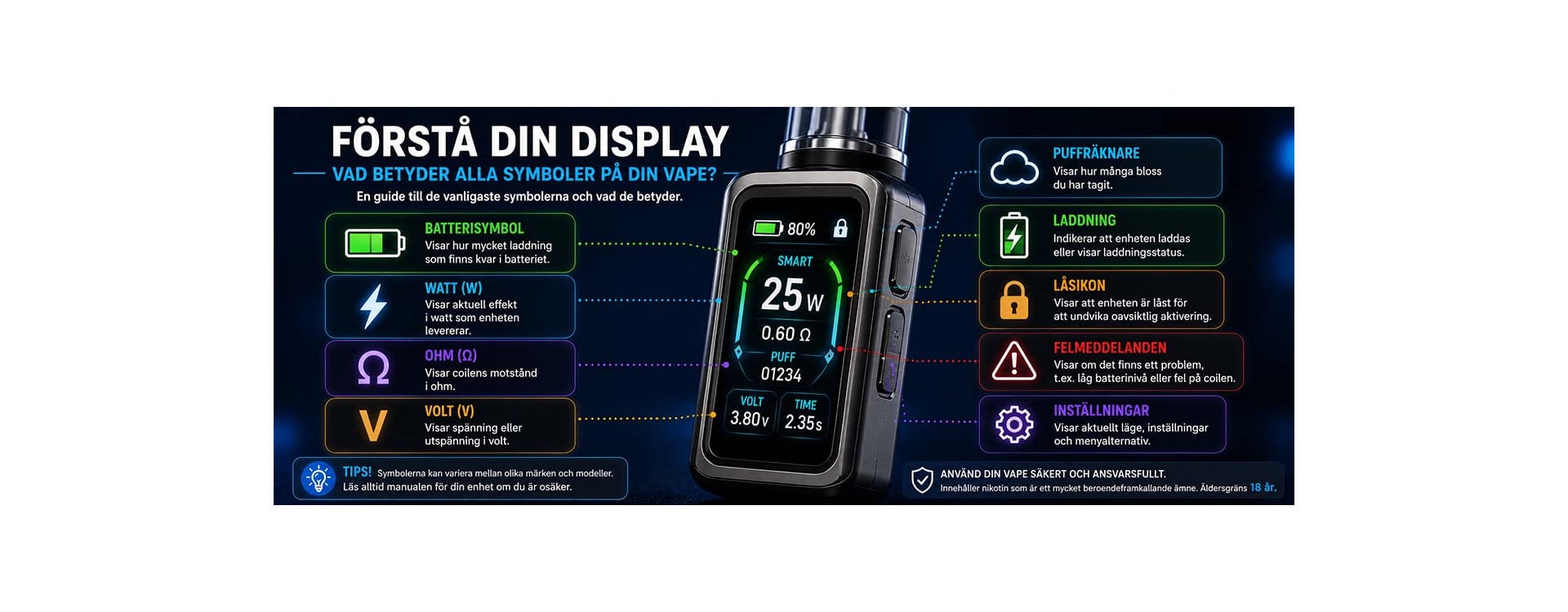
Depending on the model, the display may show:
- Battery level.
- Power in watts.
- Resistance in ohms.
- Puff counter.
- Lock status.
- Error messages.
- Charging status.
Many modern pod systems and rechargeable devices use displays to give the user better control over the device.
The Battery Symbol

The most common symbol on a vape display is the battery indicator.
It shows how much charge remains in the battery. Some devices use a traditional battery icon, while others display the battery level as a percentage.
When the battery level is low, the display may show warnings or prompt the user to charge the device.
Watts and Power
Many vape devices display the current power in watts, often abbreviated with the letter "W".
The watt value describes how much power the device delivers to the coil. On some models, the user can adjust the power, while other models do this automatically.
Different vape coils are often designed to operate within certain power ranges.
The Ohm Symbol (Ω)
The symbol Ω stands for ohm and is used to display the coil's electrical resistance.
Many displays show a value such as 0.6 Ω, 0.8 Ω or 1.2 Ω.
Resistance is a technical property of the coil and is used by the device to regulate how it operates together with the battery and power settings.
If you want to learn more about the subject, you can read our article about Ohm's law and vaping.
Voltage and Current
Some more advanced vape devices also display voltage in volts, often abbreviated as "V".
This information is mainly used to show how the device operates electrically and is usually not something most users need to adjust themselves.
On many modern devices, these settings are managed automatically by the device's electronics.
Puff Counter
Many displays also show a puff counter.
It records how many puffs have been taken since the last reset or since the device was first used.
The puff counter does not affect how the device operates but can give the user an overview of usage patterns.
Lock Icon and Safety Features
A lock icon normally indicates that the device or certain functions are locked.
On many models, lock functions are used to prevent accidental activation when the device is in a pocket or bag.
Some devices also use specific button combinations to lock or unlock functions.
Charging Symbols
When the device is charging, special charging symbols are often displayed.
This may be a battery icon that fills up, a lightning bolt symbol or a percentage-based charging indicator.
Different manufacturers use different solutions, but the purpose is to show the charging status and battery level.
Common Error Messages on the Display
Some vape devices may display error messages if something is not working properly.
Examples of common messages include:
- "No Atomizer".
- "Check Atomizer".
- "Short Circuit".
- "Low Battery".
- "Over Time".
- "Device Locked".
The exact wording varies between different manufacturers and models.
If an error message appears, you should always check the device's user manual for information about what the message means for your particular model.
Why Do Symbols Differ Between Manufacturers?
There is no universal standard for how vape displays must look. Therefore, symbols, menus and error messages may differ between different brands.
However, the basic information is often the same even when the design varies.
That is why it is always a good idea to read the product's instructions if you are unsure what a symbol means.
What Should You Keep in Mind?
- Always read the user manual for your specific model.
- Do not ignore error messages on the display.
- Use compatible coils and accessories.
- Keep the device updated if the manufacturer offers firmware updates.
- Check the battery status regularly.
The display is designed to help the user understand how the device works and identify any potential problems.
The Most Important Things to Remember
The display on a vape shows important information about the battery, power, resistance, charging and safety features. Although the symbols may vary between manufacturers, most are based on the same basic principles.
By understanding what the symbols mean, it becomes easier to interpret the device's status, identify error messages and use the product as intended by the manufacturer.
Contains nicotine, which is a highly addictive substance. Age limit: 18 years.